The problem
Tagging a big catalog by hand doesn't work
Shopify merchants use tags for collections, filters, and search, so bad tags cause real problems. On a big catalog, tagging by hand takes forever and gets inconsistent over time. People also reach for vague tags like "hot," "new," or "best-seller," which don't help anyone find the product.
AI can write tags quickly, but merchants were nervous about letting it change their live store. That worry ended up shaping the whole app.
Decision 1
Adding a review step on purpose
Merchants cared more about control than speed
My first sketch had no review step: pick products, click Generate, and the tags go straight to the store. Talking to merchants changed that. Speed wasn't what worried them. Control was.Tags run their collections, filters, and search, so an AI quietly changing them is exactly the kind of automation they'd learned not to trust. They wanted to see what it would do before it did it.
Considered
Fully automatic
The fastest option, and the one merchants said they wouldn't use. One bad batch could quietly break collections and filters.
Considered
Confirm every tag
Safe in theory, but on a big catalog the pop-ups turn into noise, and people click through without reading.
Shipped
Batch review
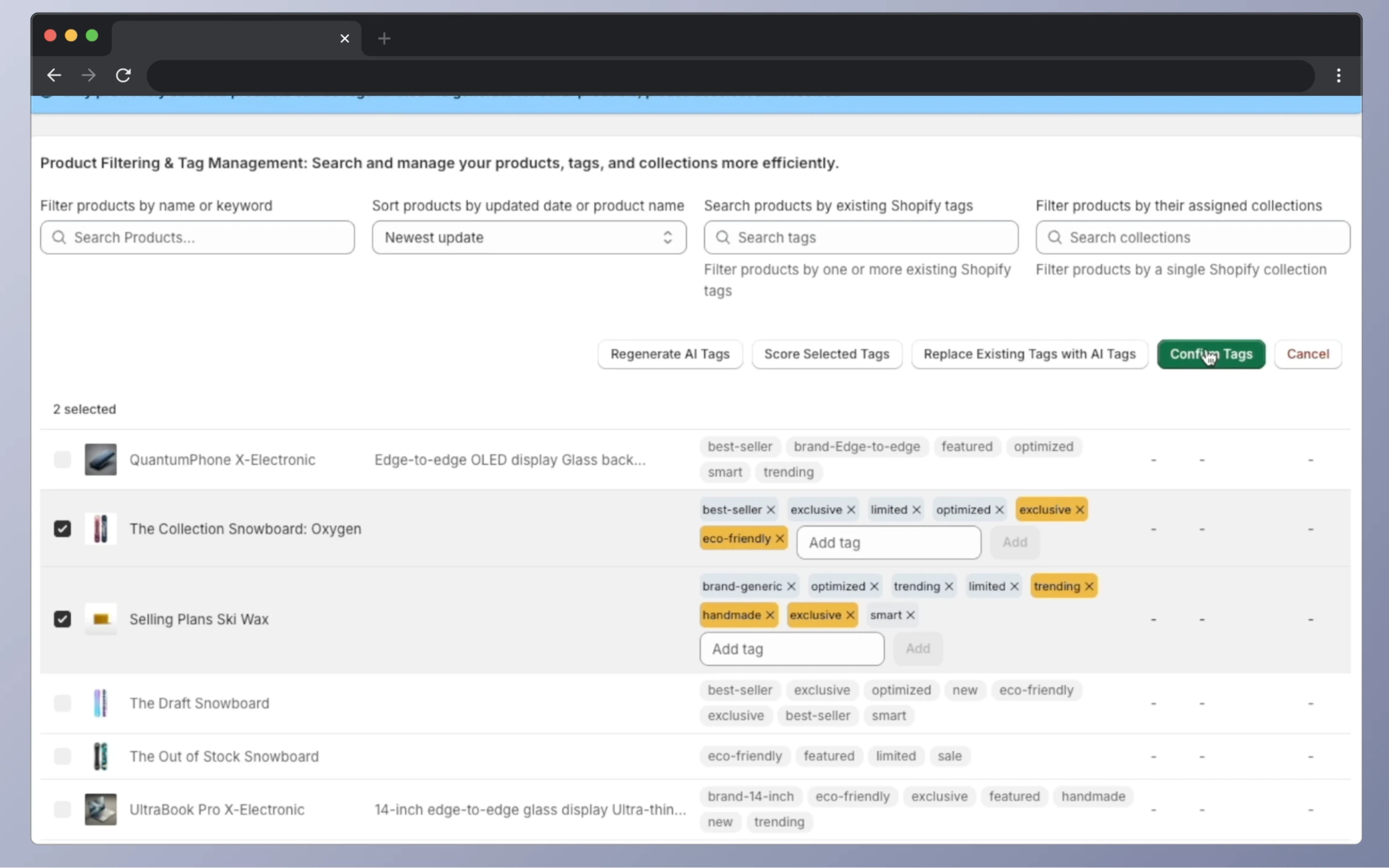
Generate tags for up to 10 products at once. They show up as drafts that look different from live tags, and one Confirm saves the whole batch.
I bet that one clear review step would earn more trust than no step at all, and be less tiring than confirming everything. That choice drove the rest of the UI. Draft tags are orange and live tags are gray, and the state doesn't rely on color alone: drafts have an "×" to remove them and an input to add more. Saving only happens when you press Confirm. There's no autosave.
How it works
Generating and reviewing tags
AI suggests, the merchant decides
Pick up to 10 products and click "Generate AI Tags." The OpenAI API reads each product's title and description and suggests tags for things like material, use, and who it's for. Nothing is saved yet.
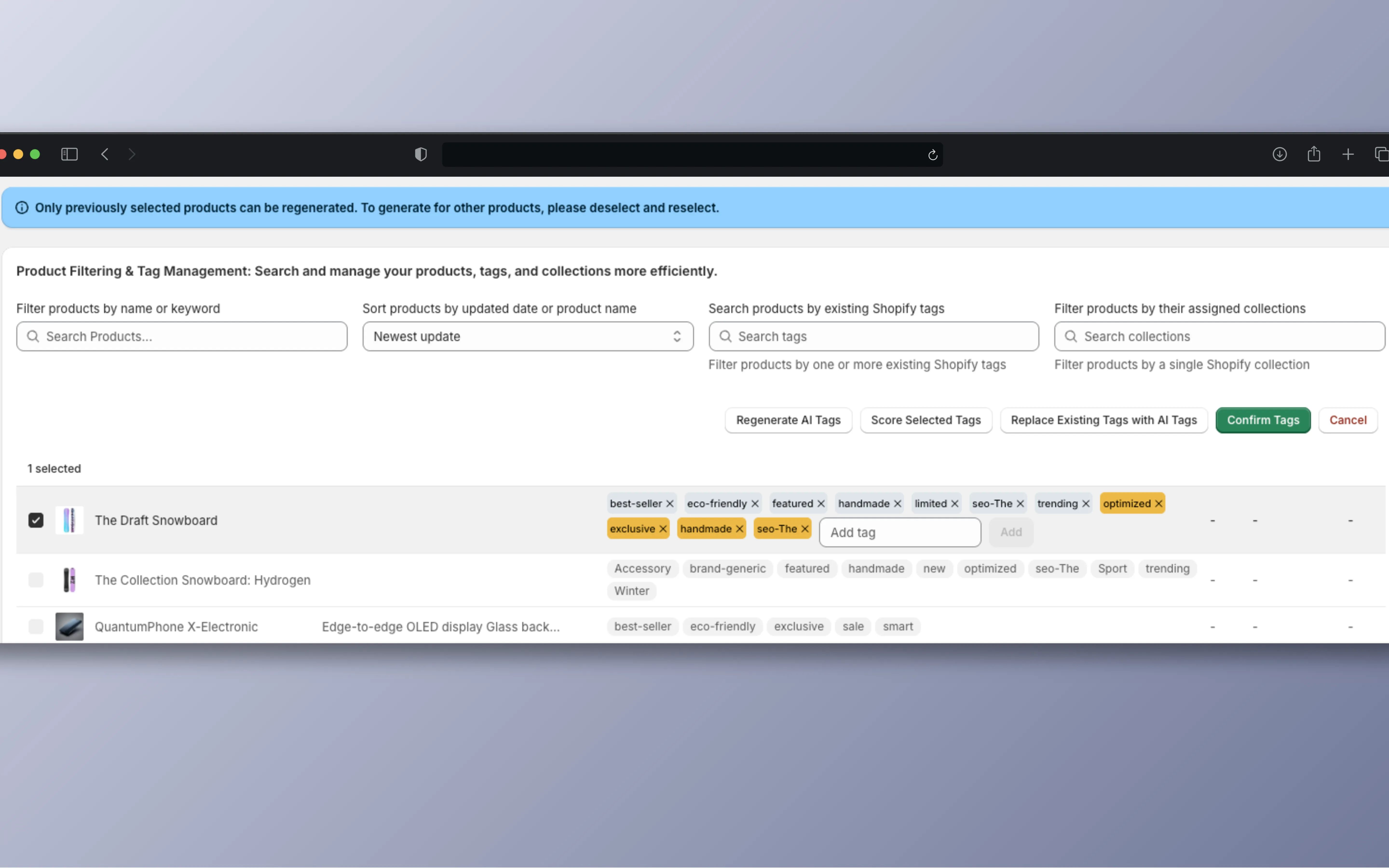
The new tags show up in orange next to the existing gray ones. Merchants can delete any they don't like, fix the wording, or type in their own. Only "Confirm Tags" calls Shopify's productUpdate mutation. There's also an option to replace all existing tags with the AI ones, and Cancel throws away every change.
Drafts stay in the app
AI tags live in the app's state until Confirm. Shopify isn't touched before that.
The merchant has the last word
Each tag has an "×" to remove it, and there's an input for adding your own.
Batches of 10
Generate and save tags for up to 10 products at a time.
Decision 2
Scoring tags by industry
A score, plus what to fix
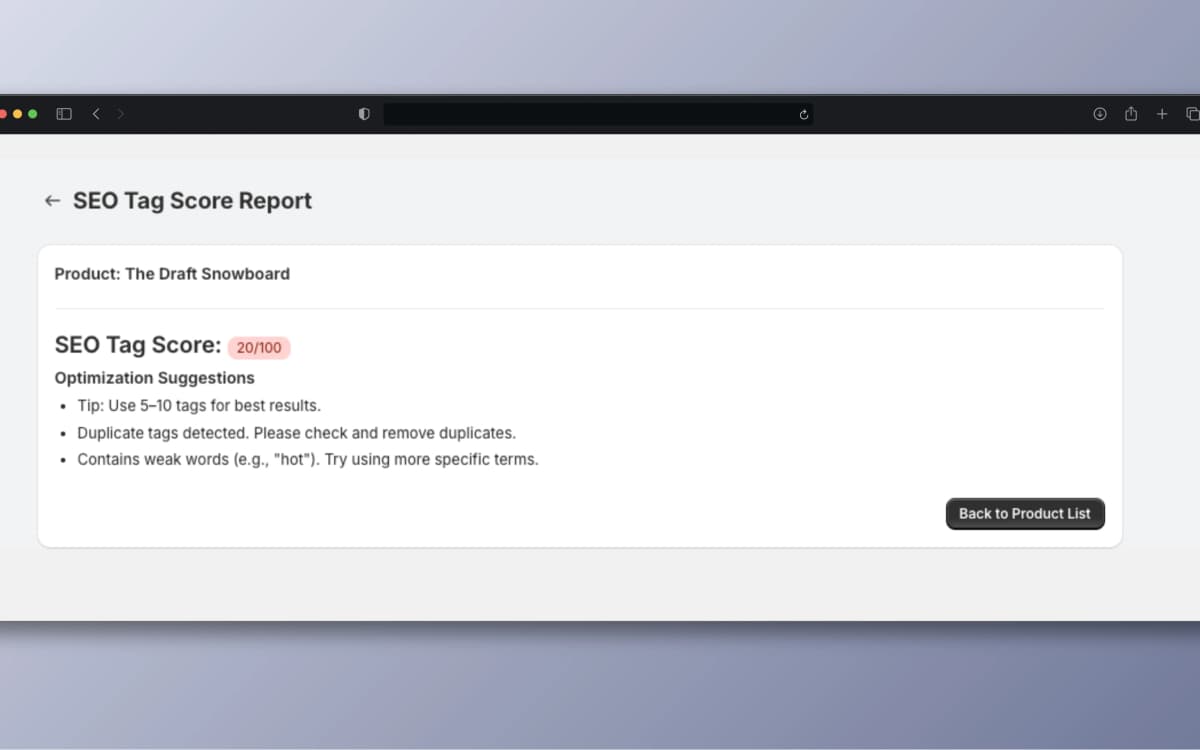
Select products and click "Score Selected Tags." Each product gets a score out of 100 across six checks: how many tags it has (5 to 10 is the target), duplicates, weak words like "hot" or "new," whether the tags cover function, material, and use, whether they match the title, and how varied they are.
One set of rules can't work for every store. A good tag for a snowboard looks nothing like a good tag for a lab instrument. So I wrote keyword lists for 13 industries, including fashion, electronics, industrial, beauty, sports, and food, each split into function, material, and use keywords. That way "waterproof" counts for sports gear, and food products don't get marked down for missing it.
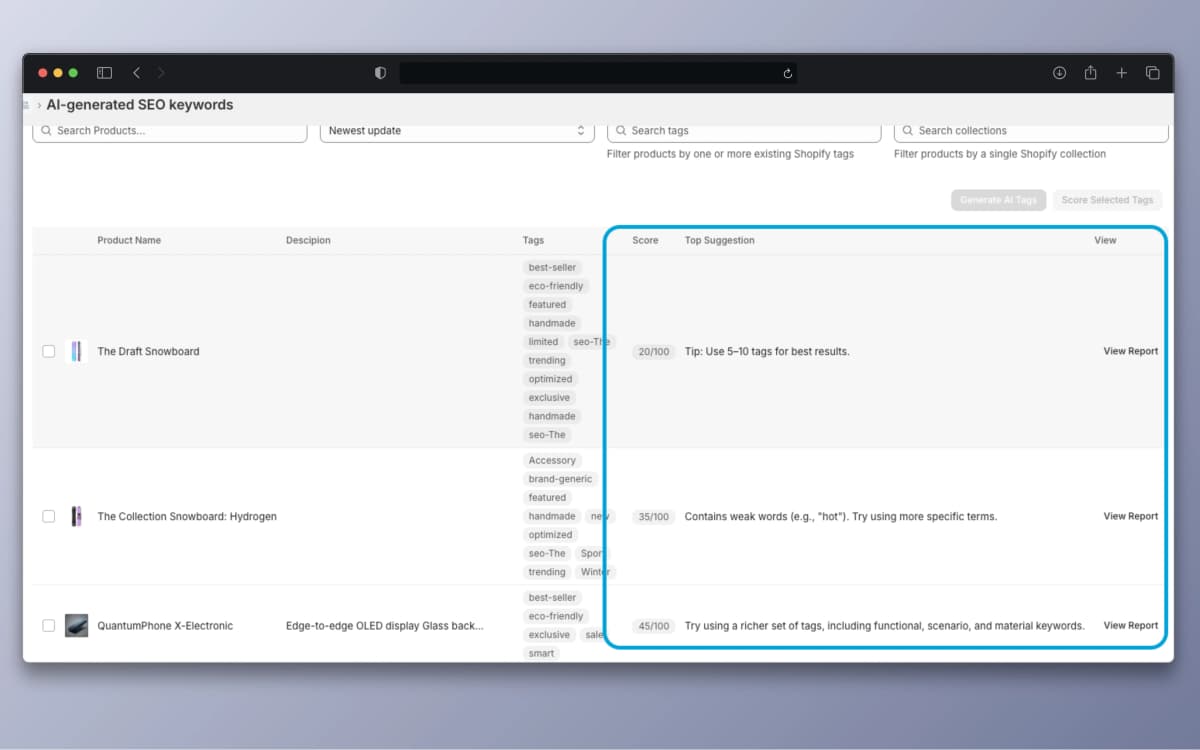
Scores and the top suggestion show up right in the product list. "View Report" opens the full breakdown with up to three suggestions, like "Contains weak words (e.g., 'hot'). Try using more specific terms."
How the 100 points break down
The details
Finding the products that need work
Search, filter, and sort a large catalog
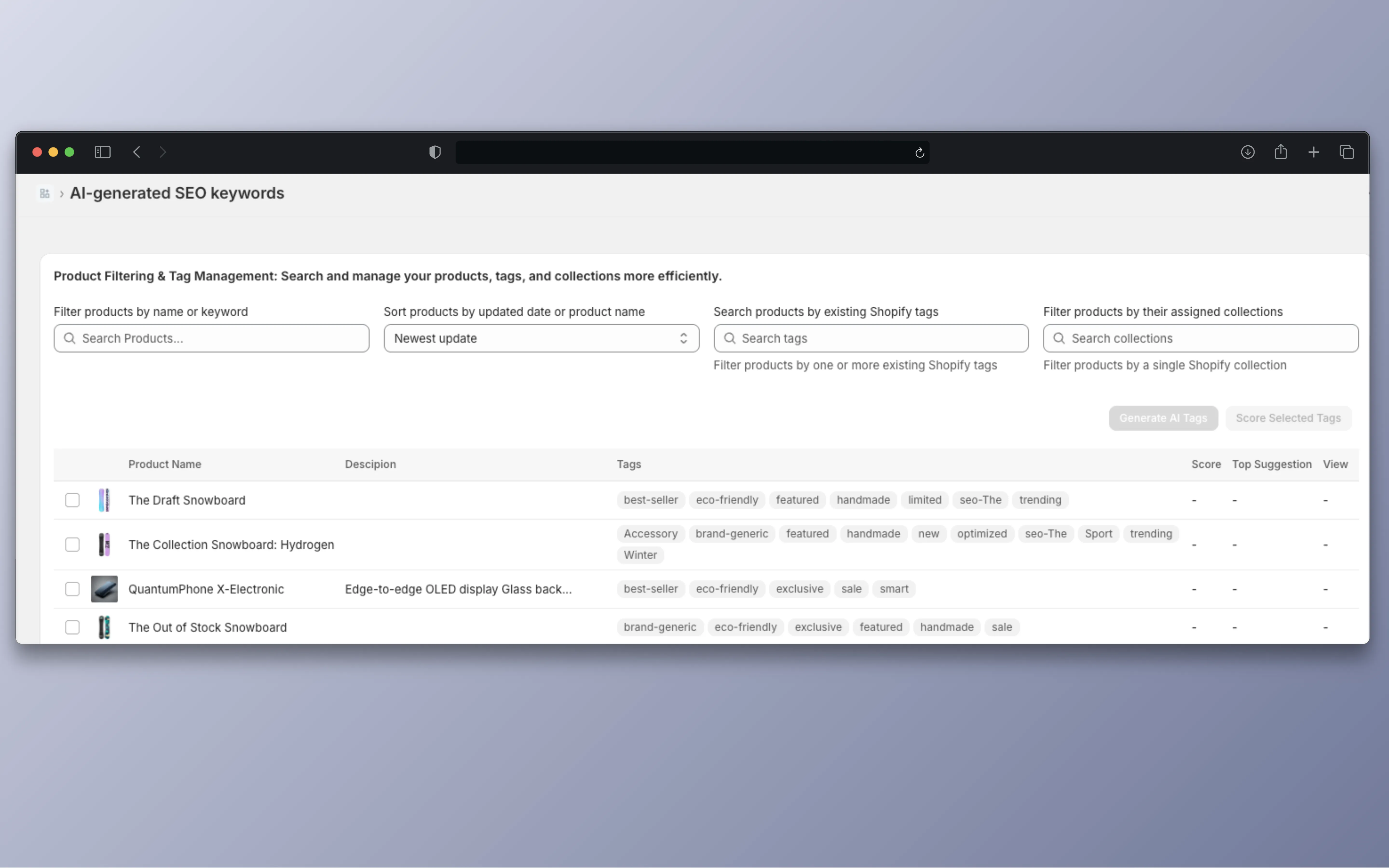
Merchants can search by product name, filter by tags a product already has, filter by collection (loaded live from Shopify GraphQL), and sort by last updated or by name. Together that makes it practical to find a group of products and fix them in batches.
Each row shows the product image, name, description, current tags, SEO score if it has one, the top suggestion, and a "View Report" link. Products with low scores or missing info are easy to spot.
Technical deep dive
Three tag states
The app keeps three versions of a product's tags at once: the original tags from Shopify, the AI drafts, and the final tags that get saved. That covers the messy cases, like generating again for a product that already has drafts, mixing in manual tags, or going back to the originals on Cancel.
// Original -> AI draft (review) -> Final (saved)
// productUpdate only runs when the merchant clicks "Confirm Tags"
const mutation = `
  mutation productUpdate($input: ProductInput!) {
    productUpdate(input: $input) {
      product { id, tags }
      userErrors { field, message }
    }
  }
`;Keyword lists for 13 industries
Fashion, electronics, industrial, beauty, baby, sports, pet, food, craft, digital, home and kitchen, adult, and general. Each list is split into function, material, and use keywords, and the scorer picks the list based on product type.
// 13 industry keyword lists
const KEYWORD_MAP = {
  fashion: { function, material, scene },
  electronics: { function, material, scene },
  industrial: { function, material, scene },
  // ...10 more
};
// The scorer picks the list for the product type
const keywords = KEYWORD_MAP[productType] || generalKeywords;Collecting every tag in the store
The tag filter needs every unique tag in the store. A server-side loop asks Shopify for products 100 at a time with cursor pagination and adds each tag to a Set to drop duplicates. It runs in a Remix loader, so the browser isn't doing the work.
// Collect every unique tag in the store, 100 products at a time
const allTags = new Set();
while (hasNextPage) {
  const data = await admin.graphql(query, {
    variables: { first: 100, after: cursor }
  });
  for (const edge of data.products.edges) {
    edge.node.tags.forEach(tag => allTags.add(tag));
    cursor = edge.cursor;
  }
  hasNextPage = data.products.pageInfo.hasNextPage;
}Keeping keys on the server
All OpenAI calls and Shopify admin requests run in Remix loaders and actions, so API keys never reach the browser. Shopify App Bridge handles the session, and Prisma stores settings and tag history. TypeScript types describe the GraphQL responses, so shape mismatches show up while I'm writing code.
What I learned
The biggest lesson was that an AI feature needs extra care in the interface. I wanted the flow to be "click a button, get tags, done." Merchants didn't trust that. The review step adds one click, and it's the reason they're willing to use the tool at all.
The scoring taught me how much the domain matters. Writing 13 keyword lists was tedious, but without them the score would just be a number nobody trusts.