The idea
Tools like v0 and Bolt have shown that describing a UI in plain English is a real workflow. I wanted to understand how that works from the inside, and to make the part where you wait for the code feel less like waiting.
So I built one where you can watch the code being written, edit it as soon as it's done, and see the preview update as you type.
Story 1
Prompt → streaming code → live preview
The core loop in under 5 seconds
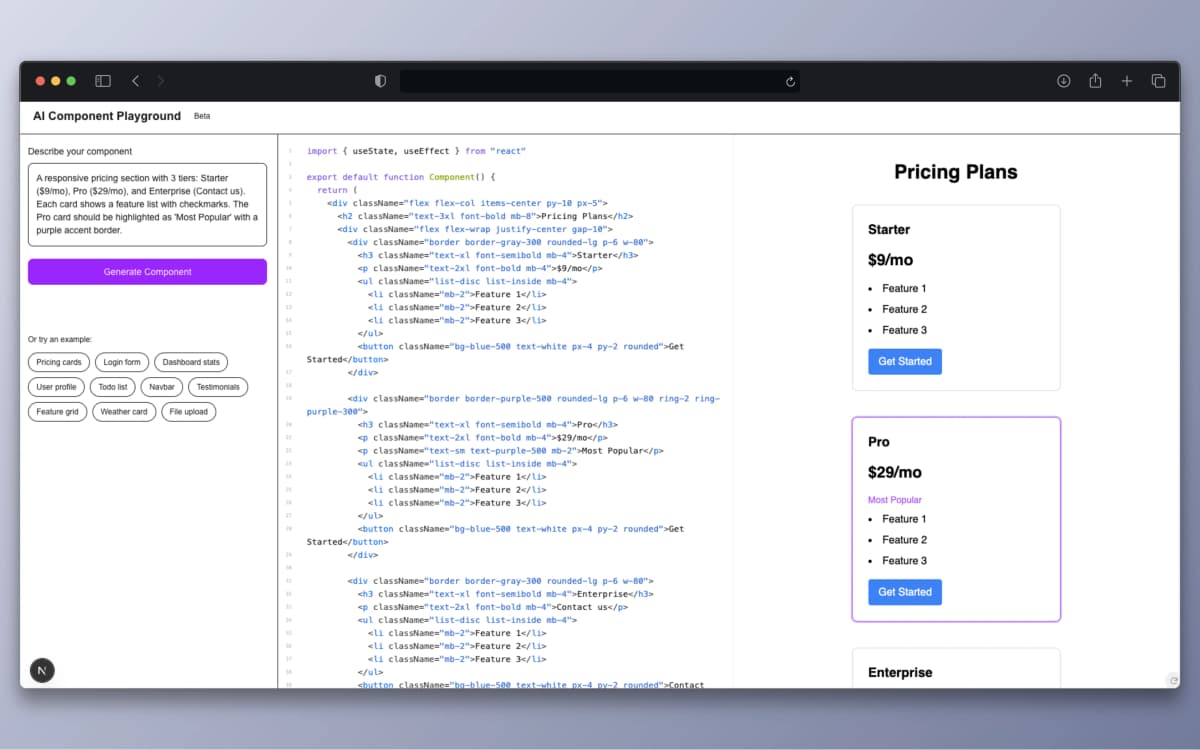
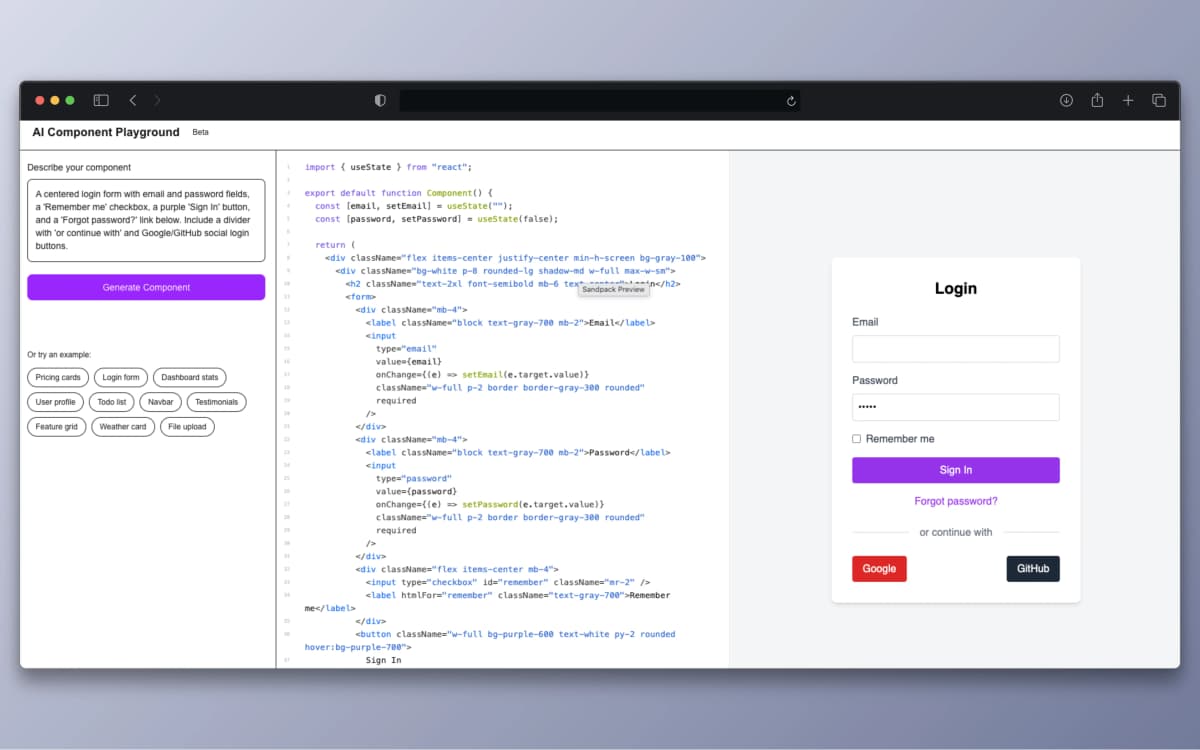
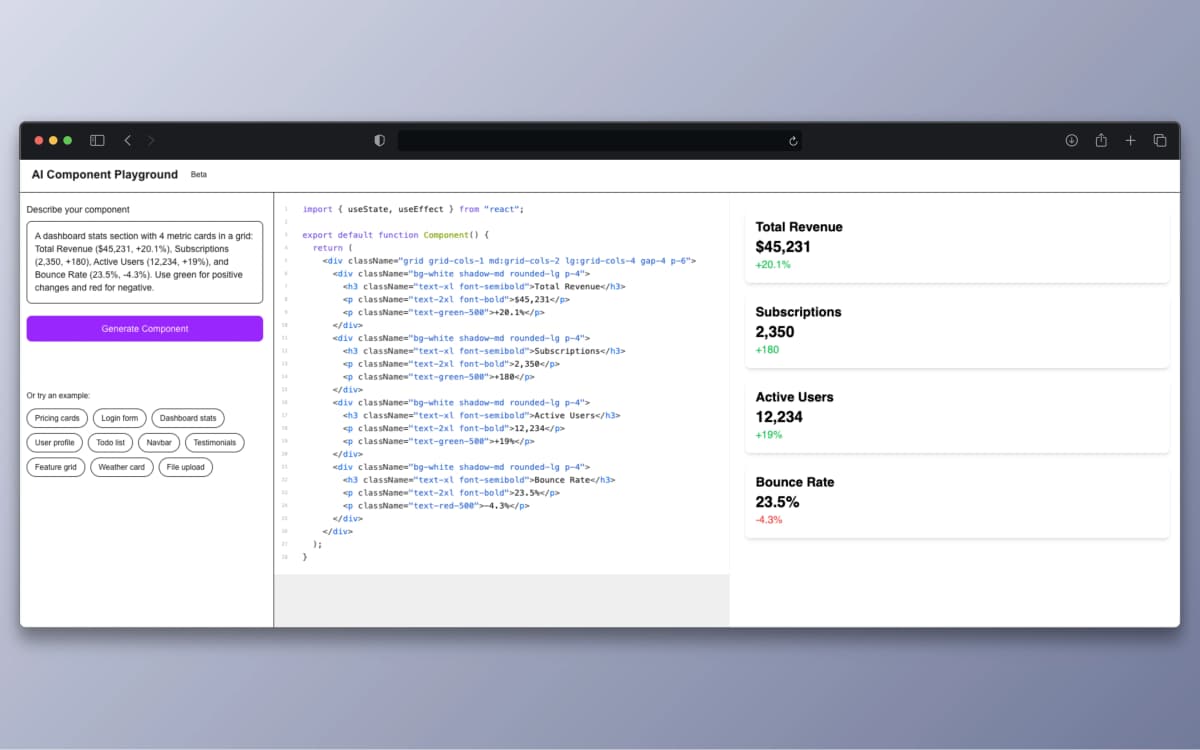
Type a description like "a pricing card with 3 tiers" and hit Generate. The AI response streams token by token into the code editor, so you can watch the component being written in real time. As soon as enough valid JSX accumulates, the Sandpack preview compiles and renders it live.
Once generation completes, the code is fully yours. Edit anything, change a color from bg-purple-600 to bg-blue-600, add a hover animation, restructure the layout, and the preview updates instantly. No save button, no refresh, no waiting.
For users who don't know what to type, five preset templates provide one-click starting points: pricing cards, login form, dashboard stats, user profile card, and an interactive todo list. Each template includes a detailed prompt that demonstrates best practices for getting high-quality AI output.
Story 2
The streaming challenge
Keeping three systems in sync on incomplete data
While a component is generating, three things have to stay in sync: the AI stream, the code editor, and the live preview. During generation, the code is incomplete. It might have an unclosed tag, a missing bracket, or a half-written className. The editor needs to display this partial code, but the preview needs to handle compilation errors gracefully without crashing.
I solved this with a two-phase state model: during streaming, the UI displays the completion value (still generating, read-only). When streaming finishes, it switches to the code state (final result, editable). Sandpack's built-in error boundary catches compilation failures during the streaming phase and displays a clean error panel instead of a white screen. Once the code completes, it automatically recompiles successfully.
Two-phase state model
Phase 1: Streaming
Source: completion (from useCompletion)
Editor: displays partial code, read-only feel
Preview: attempts compile, shows error boundary on failure
User: watches code appear token by token
Phase 2: Complete
Source: code (from useState)
Editor: fully editable, changes update preview
Preview: renders successfully, live updates on edit
User: full control to modify, experiment, iterate
Story 3
Live preview with Sandpack
Browser-based React compiler with zero server round-trips
The live preview is powered by Sandpack (by CodeSandbox), a browser-based bundler that compiles React + TypeScript in a sandboxed iframe. I chose Sandpack over a custom iframe solution because it provides a complete React compilation pipeline (Babel, module resolution, HMR), a built-in code editor with syntax highlighting, and, most importantly, error boundaries that prevent malformed code from crashing the entire page.
Tailwind CSS is loaded via CDN (cdn.tailwindcss.com) as an external resource in the Sandpack config, so AI-generated components can use any Tailwind utility class without build configuration. The generated components are self-contained, with no external imports beyond React, making them portable and easy to copy into any project.
Technical deep dive
Server-side streaming with Vercel AI SDK
The API route uses Vercel AI SDK's streamText to create a ReadableStream from OpenAI's response. The client-side useCompletion hook consumes this stream and exposes completion (incrementally updated string), isLoading, and complete() trigger. The API key stays on the server and is never exposed to the client.
// Server: API route streams OpenAI response
import { streamText } from 'ai';
import { openai } from '@ai-sdk/openai';

export async function POST(req: Request) {
  const { prompt } = await req.json();
  const result = streamText({
    model: openai('gpt-4o-mini'),
    system: `You are a React component generator...`,
    prompt,
  });
  return result.toDataStreamResponse();
}

// Client: useCompletion consumes the stream
const { complete, isLoading, completion } = useCompletion({
  api: "/api/generate",
  onFinish: (_prompt, finalCode) => setCode(finalCode),
});Prompt engineering for consistent output
The system prompt is heavily constrained to ensure the AI outputs compilable code every time: TypeScript with proper types, Tailwind-only styling (no CSS imports), default export, self-contained with no external dependencies, no markdown fences or explanations. These constraints mean the output can be fed directly to Sandpack without any post-processing or parsing.
system: `You are a React component generator.
Rules:
- Use TypeScript with proper types
- Use only Tailwind CSS for styling
- Export default the component
- Make it responsive
- Self-contained, no external dependencies
- Only output code, no explanations
- Start directly with: export default function`
Sandpack configuration for AI output
Sandpack runs a full React + TypeScript compilation pipeline in the browser. The configuration loads Tailwind via CDN, maps the AI output to /App.tsx, and enables inline error display so compilation failures during streaming show a helpful message instead of a blank screen.
<SandpackProvider
  template="react-ts"
  files={{ "/App.tsx": code }}
  options={{
    externalResources: [
      "https://cdn.tailwindcss.com"  // Tailwind via CDN
    ],
  }}
>
  <SandpackCodeEditor showLineNumbers showInlineErrors />
  <SandpackPreview showRefreshButton />
</SandpackProvider>Error resilience during streaming
During the streaming phase, the code is inherently incomplete: unclosed tags, missing brackets, partial classNames. Rather than suppressing errors or debouncing compilation, I rely on Sandpack's built-in error boundary: it displays a clean error panel while the code is invalid and automatically re-compiles when valid JSX accumulates. The onError callback on useCompletion catches API-level failures (rate limits, network errors) and displays a user-friendly message in the code panel.
Open live demo
The playground is live: describe any component and watch it generate in real time.
Open live demo